
ClamShield : l'interface Windows qui rend ClamAV enfin accessible à tous
Vous connaissez forcément ClamAV, le célèbre moteur antivirus open source maintenu par Cisco. Un moteur solide, gratuit, transparent... mais qui a toujours eu un talon d'Achille sur Windows : son interface. Ou plutôt son absence d'interface. Entre les lignes de commande, les fichiers de configuration à éditer à la main et FreshClam à planifier soi-même, autant dire que le commun des mortels passait son chemin. C'est précisément ce problème que vient résoudre ClamShield, une interface graphique Windows complète, gratuite et open source (licence GPL v2), qui transforme ClamAV en une véritable solution de sécurité de bureau. Et croyez-nous, le résultat vaut le détour.
Développé par Byron Iniotakis, ClamShield est une application de bureau légère pour Windows qui pilote le moteur ClamAV de bout en bout. Dès le premier lancement, elle télécharge et configure automatiquement le moteur ClamAV, puis récupère les dernières définitions virales. Pas de manipulation obscure, pas de PATH à modifier : vous installez, vous cliquez, c'est prêt.
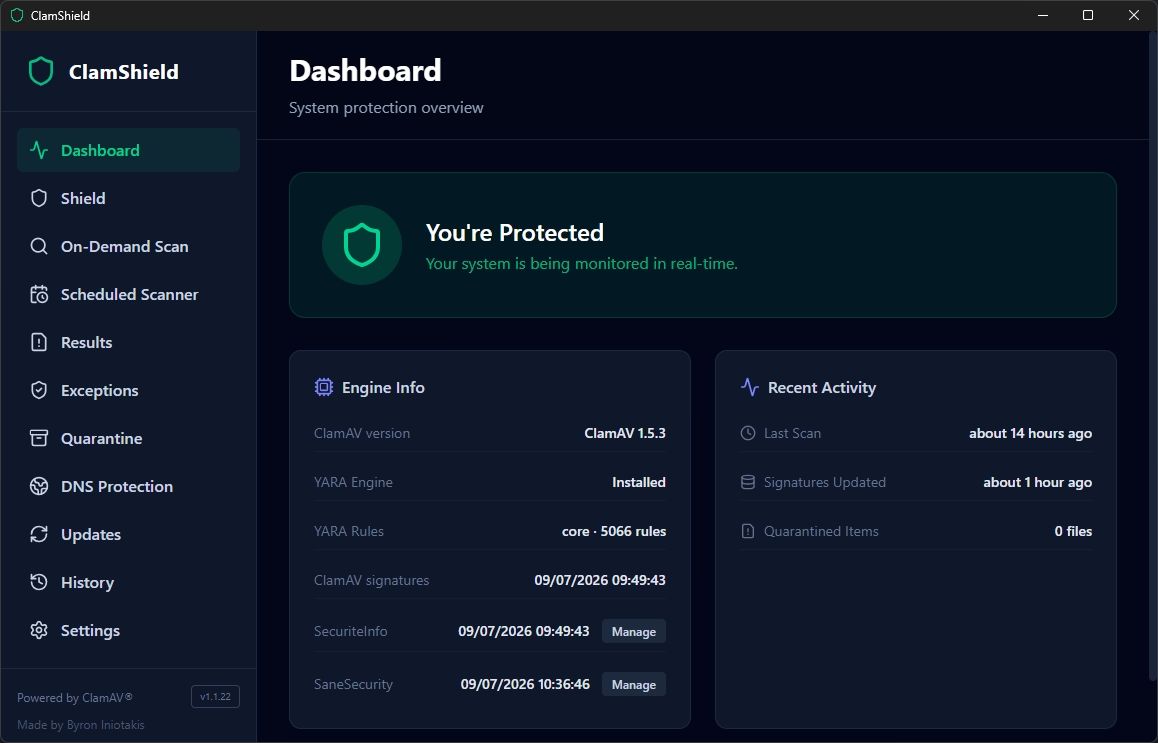
Fenêtre principale de ClamShield - Crédit photo : © SecuriteInfo.com
L'outil s'adresse aux utilisateurs avertis qui veulent une protection configurable et à faible impact, avec un contrôle direct sur les analyses, les mises à jour de signatures, la surveillance en temps réel, les exclusions et la quarantaine. Le projet est actuellement en bêta publique et ses développeurs jouent la carte de l'honnêteté : ClamShield ne prétend pas remplacer une suite antivirus commerciale ou un EDR d'entreprise. C'est un outil transparent, basé sur ClamAV, pour ceux qui veulent savoir exactement ce qui tourne sur leur machine.
Le point fort de ClamShield, c'est son bouclier temps réel pensé pour la discrétion. Là où certains antivirus transforment votre disque dur en centrale électrique, ClamShield adopte une philosophie minimaliste : le bouclier ne scanne pas les fichiers existants au démarrage, il surveille uniquement les dossiers que vous lui indiquez. Il détecte d'ailleurs automatiquement vos dossiers Bureau, Documents, Téléchargements et les répertoires de téléchargement de vos navigateurs.
Mieux encore, un cache intelligent adossé à une base SQLite évite de rescanner les fichiers dont la taille et la date de modification n'ont pas changé depuis la dernière analyse propre. Vous contrôlez la profondeur de surveillance et le nombre d'analyses simultanées (une seule par défaut, pour ne pas saturer le disque). Résultat : une protection permanente qui se fait oublier.
Côté analyses à la demande, vous avez le choix : disque complet, dossier, fichier, mémoire, et même une analyse des processus en cours d'exécution qui vérifie les exécutables utilisés par les programmes actifs. Le planificateur intégré permet des analyses hebdomadaires ou mensuelles, avec une option particulièrement maligne : le mode « inactivité », qui ne lance l'analyse que si vous n'utilisez pas votre clavier et votre souris, et qui la met en pause dès que vous reprenez la main.
Et ce n'est pas tout. ClamShield intègre également YARA, le moteur de règles bien connu des analystes malware, comme seconde couche de détection. L'application s'appuie sur les paquets de règles prêts à l'emploi de YARA Forge, avec trois profils au choix : Core (activé par défaut, précis et rapide, avec peu de faux positifs), Extended (couverture élargie) et Full (couverture maximale, idéale pour les investigations manuelles). Les règles se mettent à jour automatiquement chaque semaine, et des garde-fous (timeout de 15 secondes, taille maximale de fichier de 50 Mo) empêchent le moteur de s'emballer.
ClamAV seul, c'est bien. ClamAV dopé aux signatures additionnelles, c'est beaucoup mieux. ClamShield l'a bien compris et propose l'intégration native de deux fournisseurs tiers réputés.
ClamShield prend en charge les signatures de SecuriteInfo via l'URL FreshClam personnalisée liée à votre compte. Le mode basique configure les bases gratuites, tandis que le mode payant active les bases professionnelles, y compris les fameuses bases « 0-hour » qui détectent les menaces les plus récentes.
Point notable côté sécurité : votre jeton de compte est chiffré avec l'API de chiffrement de Windows, n'apparaît jamais dans les fichiers de configuration persistants ni sur la ligne de commande, et la configuration FreshClam temporaire est supprimée après chaque mise à jour. Du travail propre.
Sans nécessiter de compte, ClamShield peut également installer les bases SaneSecurity, téléchargées depuis les miroirs rsync publics et systématiquement vérifiées avec la clé GPG officielle du fournisseur avant installation. Deux profils sont proposés : « Malware Protection » avec 9 bases orientées malwares, phishing et exploits, ou « Complete » avec 20 bases couvrant aussi le spam, les arnaques et le spear-phishing.
ClamShield ne s'arrête pas aux fichiers. L'application propose un filtrage DNS optionnel qui applique des résolveurs publics filtrants (Cloudflare, AdGuard, CleanBrowsing ou Control D) sur vos cartes réseau actives, en IPv4 comme en IPv6 pour éviter tout contournement. Aucun compte requis, et votre configuration DNS d'origine est sauvegardée pour être restaurée en un clic.
La page de résultats, elle, fait office de centre de décision. Pour chaque détection, vous pouvez consulter le rapport VirusTotal par hash MD5 (sans envoyer le fichier), lancer manuellement une vérification par upload, mettre en quarantaine ou ajouter une exception. Cerise sur le gâteau : en cas de faux positif, ClamShield prépare automatiquement un rapport pré-rempli vers le bon destinataire selon le moteur ayant détecté le fichier, que ce soit ClamAV, SecuriteInfo, SaneSecurity ou YARA Forge. Un vrai gain de temps.
L'installation se fait via un installeur NSIS classique, à télécharger depuis la page des releases GitHub du projet et à exécuter en tant qu'administrateur :
Petite précision utile : l'application étant récente, Windows SmartScreen peut afficher un avertissement au premier lancement. Si vous avez bien téléchargé l'installeur depuis la page officielle GitHub, cliquez sur « Informations complémentaires » puis « Exécuter quand même ». ClamShield gère ensuite ses propres mises à jour, avec vérification hebdomadaire optionnelle et même installation silencieuse si vous le souhaitez. À noter également que l'application sait demander la mise en pause de la protection temps réel de Microsoft Defender pour éviter que deux scanners ne se marchent dessus.
Protection temps réel, double moteur ClamAV + YARA, signatures tierces SecuriteInfo et SaneSecurity, filtrage DNS, quarantaine, intégration VirusTotal : difficile de trouver plus complet dans le monde du logiciel libre sur Windows. Certes, le projet est encore en bêta et ne remplacera pas un EDR d'entreprise, mais pour qui cherche une solution antivirus gratuite, transparente et sérieusement outillée, ClamShield mérite clairement une place sur votre machine. Foncez.
Vous avez aimé cet article ? Voici quelques suggestions qui devraient vous plaire :
Inscrivez-vous à notre lettre d'information pour vous tenir au courant de nos actualités et de nos dernières trouvailles.
ClamShield, c'est quoi exactement ?
Développé par Byron Iniotakis, ClamShield est une application de bureau légère pour Windows qui pilote le moteur ClamAV de bout en bout. Dès le premier lancement, elle télécharge et configure automatiquement le moteur ClamAV, puis récupère les dernières définitions virales. Pas de manipulation obscure, pas de PATH à modifier : vous installez, vous cliquez, c'est prêt.
Fenêtre principale de ClamShield - Crédit photo : © SecuriteInfo.com
L'outil s'adresse aux utilisateurs avertis qui veulent une protection configurable et à faible impact, avec un contrôle direct sur les analyses, les mises à jour de signatures, la surveillance en temps réel, les exclusions et la quarantaine. Le projet est actuellement en bêta publique et ses développeurs jouent la carte de l'honnêteté : ClamShield ne prétend pas remplacer une suite antivirus commerciale ou un EDR d'entreprise. C'est un outil transparent, basé sur ClamAV, pour ceux qui veulent savoir exactement ce qui tourne sur leur machine.
Un vrai bouclier temps réel, sans plomber votre machine
Le point fort de ClamShield, c'est son bouclier temps réel pensé pour la discrétion. Là où certains antivirus transforment votre disque dur en centrale électrique, ClamShield adopte une philosophie minimaliste : le bouclier ne scanne pas les fichiers existants au démarrage, il surveille uniquement les dossiers que vous lui indiquez. Il détecte d'ailleurs automatiquement vos dossiers Bureau, Documents, Téléchargements et les répertoires de téléchargement de vos navigateurs.
Mieux encore, un cache intelligent adossé à une base SQLite évite de rescanner les fichiers dont la taille et la date de modification n'ont pas changé depuis la dernière analyse propre. Vous contrôlez la profondeur de surveillance et le nombre d'analyses simultanées (une seule par défaut, pour ne pas saturer le disque). Résultat : une protection permanente qui se fait oublier.
Côté analyses à la demande, vous avez le choix : disque complet, dossier, fichier, mémoire, et même une analyse des processus en cours d'exécution qui vérifie les exécutables utilisés par les programmes actifs. Le planificateur intégré permet des analyses hebdomadaires ou mensuelles, avec une option particulièrement maligne : le mode « inactivité », qui ne lance l'analyse que si vous n'utilisez pas votre clavier et votre souris, et qui la met en pause dès que vous reprenez la main.
YARA en seconde couche de détection
Et ce n'est pas tout. ClamShield intègre également YARA, le moteur de règles bien connu des analystes malware, comme seconde couche de détection. L'application s'appuie sur les paquets de règles prêts à l'emploi de YARA Forge, avec trois profils au choix : Core (activé par défaut, précis et rapide, avec peu de faux positifs), Extended (couverture élargie) et Full (couverture maximale, idéale pour les investigations manuelles). Les règles se mettent à jour automatiquement chaque semaine, et des garde-fous (timeout de 15 secondes, taille maximale de fichier de 50 Mo) empêchent le moteur de s'emballer.
Des signatures tierces pour booster la détection
ClamAV seul, c'est bien. ClamAV dopé aux signatures additionnelles, c'est beaucoup mieux. ClamShield l'a bien compris et propose l'intégration native de deux fournisseurs tiers réputés.
Les signatures SecuriteInfo
ClamShield prend en charge les signatures de SecuriteInfo via l'URL FreshClam personnalisée liée à votre compte. Le mode basique configure les bases gratuites, tandis que le mode payant active les bases professionnelles, y compris les fameuses bases « 0-hour » qui détectent les menaces les plus récentes.
Point notable côté sécurité : votre jeton de compte est chiffré avec l'API de chiffrement de Windows, n'apparaît jamais dans les fichiers de configuration persistants ni sur la ligne de commande, et la configuration FreshClam temporaire est supprimée après chaque mise à jour. Du travail propre.
Les signatures SaneSecurity
Sans nécessiter de compte, ClamShield peut également installer les bases SaneSecurity, téléchargées depuis les miroirs rsync publics et systématiquement vérifiées avec la clé GPG officielle du fournisseur avant installation. Deux profils sont proposés : « Malware Protection » avec 9 bases orientées malwares, phishing et exploits, ou « Complete » avec 20 bases couvrant aussi le spam, les arnaques et le spear-phishing.
Protection DNS et vérifications VirusTotal en bonus
ClamShield ne s'arrête pas aux fichiers. L'application propose un filtrage DNS optionnel qui applique des résolveurs publics filtrants (Cloudflare, AdGuard, CleanBrowsing ou Control D) sur vos cartes réseau actives, en IPv4 comme en IPv6 pour éviter tout contournement. Aucun compte requis, et votre configuration DNS d'origine est sauvegardée pour être restaurée en un clic.
La page de résultats, elle, fait office de centre de décision. Pour chaque détection, vous pouvez consulter le rapport VirusTotal par hash MD5 (sans envoyer le fichier), lancer manuellement une vérification par upload, mettre en quarantaine ou ajouter une exception. Cerise sur le gâteau : en cas de faux positif, ClamShield prépare automatiquement un rapport pré-rempli vers le bon destinataire selon le moteur ayant détecté le fichier, que ce soit ClamAV, SecuriteInfo, SaneSecurity ou YARA Forge. Un vrai gain de temps.
Installation et mise en route
L'installation se fait via un installeur NSIS classique, à télécharger depuis la page des releases GitHub du projet et à exécuter en tant qu'administrateur :
ClamShield-Setup-x.y.z.exe
Petite précision utile : l'application étant récente, Windows SmartScreen peut afficher un avertissement au premier lancement. Si vous avez bien téléchargé l'installeur depuis la page officielle GitHub, cliquez sur « Informations complémentaires » puis « Exécuter quand même ». ClamShield gère ensuite ses propres mises à jour, avec vérification hebdomadaire optionnelle et même installation silencieuse si vous le souhaitez. À noter également que l'application sait demander la mise en pause de la protection temps réel de Microsoft Defender pour éviter que deux scanners ne se marchent dessus.
Notre verdict
ClamShield réussit là où beaucoup ont échoué : offrir à ClamAV une interface Windows moderne, complète et respectueuse des ressources, sans rien sacrifier de la transparence de l'open source.
Protection temps réel, double moteur ClamAV + YARA, signatures tierces SecuriteInfo et SaneSecurity, filtrage DNS, quarantaine, intégration VirusTotal : difficile de trouver plus complet dans le monde du logiciel libre sur Windows. Certes, le projet est encore en bêta et ne remplacera pas un EDR d'entreprise, mais pour qui cherche une solution antivirus gratuite, transparente et sérieusement outillée, ClamShield mérite clairement une place sur votre machine. Foncez.
Quelques suggestions sur le sujet de ClamAV
Vous avez aimé cet article ? Voici quelques suggestions qui devraient vous plaire :
- ClamAV : l'antivirus open source multiplateforme et gratuit
- Détectez encore plus de malwares avec nos signatures pour l'antivirus ClamAV
- Résolution des problèmes les plus courants de l'antivirus ClamAV
- Quoi de neuf avec la nouvelle version de l'antivirus ClamAV ?
- FAQ des signatures non officielles de SecuriteInfo.com pour l'antivirus ClamAV, optimisations de l'usage et de la configuration
Tags
Inscription à notre lettre d'information
Inscrivez-vous à notre lettre d'information pour vous tenir au courant de nos actualités et de nos dernières trouvailles.


© 2000-2026 - Tous droits réservés SecuriteInfo.com