
ClamShield: The Windows Interface That Finally Makes ClamAV Accessible to Everyone
You've surely heard of ClamAV, the well-known open-source antivirus engine maintained by Cisco. A solid, free, transparent engine... but one that has always had an Achilles' heel on Windows: its interface. Or rather, its lack of one. Between command lines, configuration files to edit by hand, and having to schedule FreshClam yourself, it's safe to say most people gave up before starting. This is exactly the problem ClamShield solves: a complete, free, and open-source (GPL v2 licensed) graphical interface for Windows that turns ClamAV into a genuine desktop security solution. And trust us, it's worth a look.
Developed by Byron Iniotakis, ClamShield is a lightweight desktop application for Windows that drives the ClamAV engine from start to finish. From the very first launch, it automatically downloads and configures the ClamAV engine, then fetches the latest virus definitions. No obscure tinkering, no PATH to edit: you install it, click, and you're ready to go.
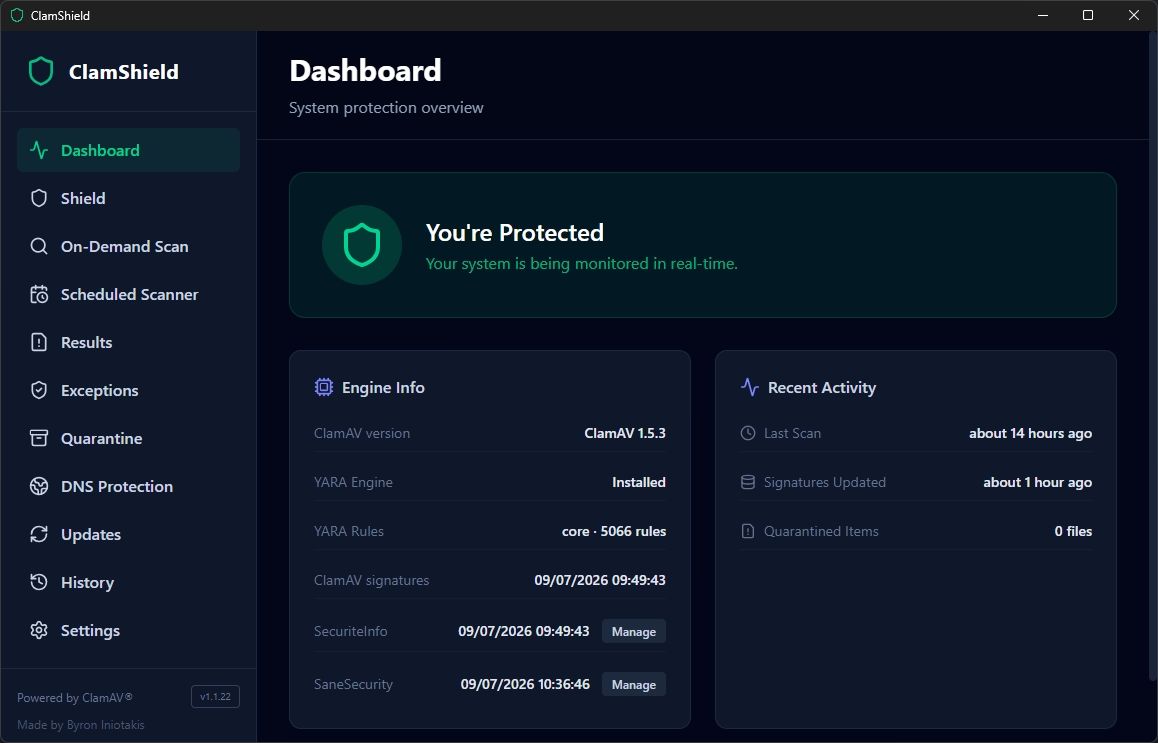
ClamShield main window - Photo credit: © SecuriteInfo.com
The tool is aimed at savvy users who want configurable, lightweight protection with direct control over scans, signature updates, real-time monitoring, exclusions, and quarantine. The project is currently in public beta, and its developers are upfront about it: ClamShield doesn't claim to replace a commercial antivirus suite or an enterprise EDR. It's a transparent tool, built on ClamAV, for those who want to know exactly what's running on their machine.
ClamShield's standout feature is its real-time shield, designed with discretion in mind. Where some antivirus programs turn your hard drive into a power plant, ClamShield takes a minimalist approach: the shield doesn't scan existing files on startup, it only monitors the folders you point it to. It even automatically detects your Desktop, Documents, and Downloads folders, along with your browsers' download directories.
Even better, a smart cache backed by an SQLite database avoids rescanning files whose size and modification date haven't changed since the last clean scan. You control the monitoring depth and the number of simultaneous scans (just one by default, to avoid overloading the disk). The result: permanent protection that stays out of your way.
On the on-demand scanning side, you have plenty of choices: full disk, folder, file, memory, and even a running-processes scan that checks the executables used by active programs. The built-in scheduler allows weekly or monthly scans, with a particularly clever option: "idle" mode, which only launches a scan when you're not using your keyboard and mouse, and pauses as soon as you take control again.
And that's not all. ClamShield also integrates YARA, the rule engine well known to malware analysts, as a second layer of detection. The app relies on ready-to-use rule packs from YARA Forge, with three profiles to choose from: Core (enabled by default, precise and fast, with few false positives), Extended (broader coverage), and Full (maximum coverage, ideal for manual investigations). Rules update automatically every week, and safeguards (a 15-second timeout, a 50 MB maximum file size) keep the engine from running away with itself.
ClamAV on its own is good. ClamAV boosted with additional signatures is much better. ClamShield understood this well and offers native integration with two well-regarded third-party providers.
ClamShield supports SecuriteInfo's signatures via the custom FreshClam URL linked to your account. Basic mode configures the free databases, while paid mode activates the professional databases, including the well-known "0-hour" databases that detect the most recent threats.
Worth noting on the security side: your account token is encrypted using the Windows encryption API, never appears in persistent configuration files or on the command line, and the temporary FreshClam configuration is deleted after each update. Clean work.
Without requiring an account, ClamShield can also install SaneSecurity databases, downloaded from public rsync mirrors and systematically verified with the provider's official GPG key before installation. Two profiles are offered: "Malware Protection" with 9 databases focused on malware, phishing, and exploits, or "Complete" with 20 databases also covering spam, scams, and spear-phishing.
ClamShield doesn't stop at files. The app offers optional DNS filtering that applies public filtering resolvers (Cloudflare, AdGuard, CleanBrowsing, or Control D) to your active network adapters, both in IPv4 and IPv6 to prevent any bypass. No account required, and your original DNS configuration is saved so it can be restored with a single click.
The results page acts as a decision center. For each detection, you can check the VirusTotal report by MD5 hash (without uploading the file), manually trigger an upload check, quarantine the file, or add an exception. The icing on the cake: in case of a false positive, ClamShield automatically prepares a pre-filled report to the right recipient depending on which engine flagged the file, whether that's ClamAV, SecuriteInfo, SaneSecurity, or YARA Forge. A real time-saver.
Installation is done via a standard NSIS installer, downloaded from the project's GitHub releases page and run as administrator:
A useful note: since the app is new, Windows SmartScreen may show a warning on first launch. If you downloaded the installer from the official GitHub page, click "More info" then "Run anyway." ClamShield then handles its own updates, with an optional weekly check and even silent installation if you prefer. It's also worth noting that the app knows how to request that Microsoft Defender's real-time protection be paused, to prevent two scanners from stepping on each other's toes.
Real-time protection, dual ClamAV + YARA engine, third-party SecuriteInfo and SaneSecurity signatures, DNS filtering, quarantine, VirusTotal integration: it's hard to find anything more complete in the world of free software on Windows. Sure, the project is still in beta and won't replace an enterprise EDR, but for anyone looking for a free, transparent, and seriously well-equipped antivirus solution, ClamShield clearly deserves a spot on your machine. Go for it.
Enjoyed this article? Here are a few more suggestions you might like:
Inscrivez-vous à notre lettre d'information pour vous tenir au courant de nos actualités et de nos dernières trouvailles.
So what exactly is ClamShield?
Developed by Byron Iniotakis, ClamShield is a lightweight desktop application for Windows that drives the ClamAV engine from start to finish. From the very first launch, it automatically downloads and configures the ClamAV engine, then fetches the latest virus definitions. No obscure tinkering, no PATH to edit: you install it, click, and you're ready to go.
ClamShield main window - Photo credit: © SecuriteInfo.com
The tool is aimed at savvy users who want configurable, lightweight protection with direct control over scans, signature updates, real-time monitoring, exclusions, and quarantine. The project is currently in public beta, and its developers are upfront about it: ClamShield doesn't claim to replace a commercial antivirus suite or an enterprise EDR. It's a transparent tool, built on ClamAV, for those who want to know exactly what's running on their machine.
A real-time shield that won't bog down your machine
ClamShield's standout feature is its real-time shield, designed with discretion in mind. Where some antivirus programs turn your hard drive into a power plant, ClamShield takes a minimalist approach: the shield doesn't scan existing files on startup, it only monitors the folders you point it to. It even automatically detects your Desktop, Documents, and Downloads folders, along with your browsers' download directories.
Even better, a smart cache backed by an SQLite database avoids rescanning files whose size and modification date haven't changed since the last clean scan. You control the monitoring depth and the number of simultaneous scans (just one by default, to avoid overloading the disk). The result: permanent protection that stays out of your way.
On the on-demand scanning side, you have plenty of choices: full disk, folder, file, memory, and even a running-processes scan that checks the executables used by active programs. The built-in scheduler allows weekly or monthly scans, with a particularly clever option: "idle" mode, which only launches a scan when you're not using your keyboard and mouse, and pauses as soon as you take control again.
YARA as a second layer of detection
And that's not all. ClamShield also integrates YARA, the rule engine well known to malware analysts, as a second layer of detection. The app relies on ready-to-use rule packs from YARA Forge, with three profiles to choose from: Core (enabled by default, precise and fast, with few false positives), Extended (broader coverage), and Full (maximum coverage, ideal for manual investigations). Rules update automatically every week, and safeguards (a 15-second timeout, a 50 MB maximum file size) keep the engine from running away with itself.
Third-party signatures to boost detection
ClamAV on its own is good. ClamAV boosted with additional signatures is much better. ClamShield understood this well and offers native integration with two well-regarded third-party providers.
SecuriteInfo signatures
ClamShield supports SecuriteInfo's signatures via the custom FreshClam URL linked to your account. Basic mode configures the free databases, while paid mode activates the professional databases, including the well-known "0-hour" databases that detect the most recent threats.
Worth noting on the security side: your account token is encrypted using the Windows encryption API, never appears in persistent configuration files or on the command line, and the temporary FreshClam configuration is deleted after each update. Clean work.
SaneSecurity signatures
Without requiring an account, ClamShield can also install SaneSecurity databases, downloaded from public rsync mirrors and systematically verified with the provider's official GPG key before installation. Two profiles are offered: "Malware Protection" with 9 databases focused on malware, phishing, and exploits, or "Complete" with 20 databases also covering spam, scams, and spear-phishing.
DNS protection and VirusTotal checks as a bonus
ClamShield doesn't stop at files. The app offers optional DNS filtering that applies public filtering resolvers (Cloudflare, AdGuard, CleanBrowsing, or Control D) to your active network adapters, both in IPv4 and IPv6 to prevent any bypass. No account required, and your original DNS configuration is saved so it can be restored with a single click.
The results page acts as a decision center. For each detection, you can check the VirusTotal report by MD5 hash (without uploading the file), manually trigger an upload check, quarantine the file, or add an exception. The icing on the cake: in case of a false positive, ClamShield automatically prepares a pre-filled report to the right recipient depending on which engine flagged the file, whether that's ClamAV, SecuriteInfo, SaneSecurity, or YARA Forge. A real time-saver.
Installation and setup
Installation is done via a standard NSIS installer, downloaded from the project's GitHub releases page and run as administrator:
ClamShield-Setup-x.y.z.exe
A useful note: since the app is new, Windows SmartScreen may show a warning on first launch. If you downloaded the installer from the official GitHub page, click "More info" then "Run anyway." ClamShield then handles its own updates, with an optional weekly check and even silent installation if you prefer. It's also worth noting that the app knows how to request that Microsoft Defender's real-time protection be paused, to prevent two scanners from stepping on each other's toes.
Our verdict
ClamShield succeeds where many others have failed: giving ClamAV a modern, complete, and resource-friendly Windows interface, without sacrificing any of open source's transparency.
Real-time protection, dual ClamAV + YARA engine, third-party SecuriteInfo and SaneSecurity signatures, DNS filtering, quarantine, VirusTotal integration: it's hard to find anything more complete in the world of free software on Windows. Sure, the project is still in beta and won't replace an enterprise EDR, but for anyone looking for a free, transparent, and seriously well-equipped antivirus solution, ClamShield clearly deserves a spot on your machine. Go for it.
A few more suggestions on ClamAV
Enjoyed this article? Here are a few more suggestions you might like:
- Solving the most common ClamAV antivirus problems
- What's new in the latest version of the ClamAV antivirus?
- Detect even more malware with our signatures for the ClamAV antivirus
- FAQ on SecuriteInfo.com's unofficial signatures for ClamAV antivirus, usage and configuration tips
Tags
Inscription à notre lettre d'information
Inscrivez-vous à notre lettre d'information pour vous tenir au courant de nos actualités et de nos dernières trouvailles.


© 2000-2026 - Tous droits réservés SecuriteInfo.com